Shopify vs WooCommerce Which Is Better for SEO in 2027
Shopify and WooCommerce can both support a successful ecommerce SEO strategy. The better choice depends on the store you need to run, the changes you need to make and the people available to maintain it.
Shopify offers a hosted platform with many technical tasks managed within the service. WooCommerce runs on WordPress and gives you greater scope to configure the website and its hosting. That control brings implementation and maintenance responsibilities.
For a 2027 platform decision, compare the work required on your own store. A generic speed score or a claim that one platform ranks faster is a poor reason to move a functioning business.
Compare the responsibilities as well as the features
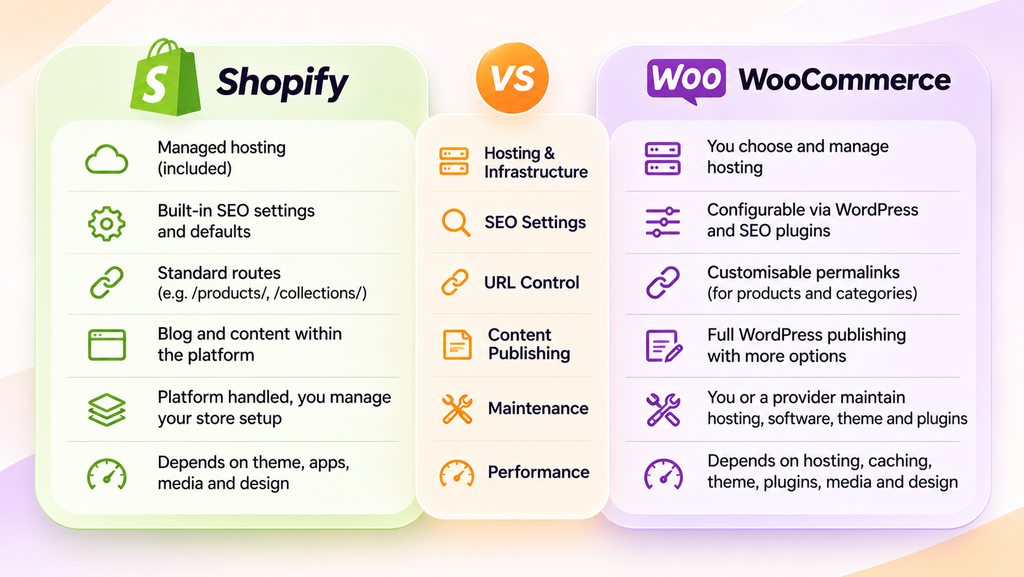
| Area | Shopify | WooCommerce |
|---|---|---|
| Hosting and infrastructure | Managed within the platform | Depends on the hosting and support arrangement you choose |
| SEO settings | Built-in editing and automated defaults with platform conventions | WordPress and WooCommerce configuration often supported by SEO plugins |
| URL control | Standard storefront routes with editable handles | Configurable product and taxonomy permalinks |
| Content publishing | Blog pages and templates within the storefront system | WordPress publishing with extensive options for content structures |
| Maintenance | Platform infrastructure managed by Shopify with merchant responsibility for store configuration | An owner or provider must maintain the hosting, software, theme and extensions |
| Performance | Depends on the theme, apps, scripts, media and page design | Depends on hosting, caching, theme, plugins, media and page design |
The comparison describes typical hosted Shopify storefronts and self-hosted WooCommerce stores. Headless builds and managed service arrangements can change the responsibilities, so evaluate the architecture you are actually buying.
What Shopify provides for SEO
Shopify documents built-in SEO features including automatically generated canonical tags, a sitemap and robots.txt, alongside editable titles, descriptions and page handles. These provide a useful starting point.
You still need to organise collections, write useful product information and link customers to the right pages. Review the output of the actual theme and apps rather than assuming every default suits the catalogue. An automatically generated sitemap does not guarantee that Google will index every URL.
Shopify can suit a team that wants a hosted retail platform and a defined process for managing products and content. Its value is partly operational: the team can spend less time managing the server environment. That does not remove the need for testing or ongoing SEO decisions.
Our Shopify SEO services assess the store’s implementation, including collection structure and the pages supporting valuable product searches.
Understand the limits of platform conventions
Shopify storefronts commonly use routes such as /products/ and /collections/. You can edit handles, but customising the wider routing is different from configuring a self-hosted WordPress installation. Check any unusual URL requirements before choosing the platform.
Robots.txt is not completely inaccessible. Shopify supports customisation through robots.txt.liquid. Changes need care because a broad rule can prevent access to useful content. More configuration options are not automatically better unless the team can use and maintain them correctly.
What WooCommerce provides for SEO
WooCommerce gives a business access to the WordPress publishing environment and a configurable ecommerce implementation. It can suit stores with established editorial workflows, particular content relationships or requirements that justify custom development.
Its permalink settings allow configuration of product and taxonomy URL bases. Themes, plugins and development can extend other parts of the site. Check compatibility and ongoing support before treating a proposed customisation as a routine feature.
Greater control does not automatically create better search performance. The store still needs an understandable structure, accurate product information and dependable technical implementation. A plugin can expose useful settings while leaving those decisions to the person using it.
Our WooCommerce SEO services focus on the site’s real configuration rather than a generic platform score.
Assign responsibility for maintenance
Agree who owns updates, backups, security monitoring and recovery. WooCommerce’s update guidance covers preparation, applying updates and checking the store afterwards.
Test important changes in staging where practical, including product selection, checkout, payment gateways and tracking. A managed host or maintenance provider can take on parts of this work, but the responsibilities should be explicit in the agreement.
Compare performance on representative pages
Neither platform guarantees a fast store or passing Core Web Vitals scores. Test the homepage, a busy category, a product with variants and a content page on realistic mobile conditions. Review field data where available alongside lab diagnostics.
For Shopify, examine the effect of the theme, app embeds, tracking scripts and media. For WooCommerce, include hosting, caching and plugin behaviour in the investigation. Separate browsing pages from dynamic account and checkout functions when planning caching.
Google’s page experience guidance explains why good Core Web Vitals scores alone do not guarantee strong rankings. Compare actual user experience and the effort required to improve it, rather than assuming the platform name settles the question.
Check the category and filter strategy
A store’s catalogue can create many near-duplicate or low-value URLs through filters, sorting and product variations. Decide which combinations deserve a searchable landing page and which are primarily tools for shoppers already browsing the store.
For example, a distinct product range with useful demand may warrant a maintained category page. Every combination of size, colour, price and stock status does not necessarily need its own indexed page.
On either platform, inspect internal links, canonical signals, sitemap inclusion and crawl rules together. Blocking a URL in robots.txt does not by itself remove it from Google’s index. Our technical SEO services can help identify the relevant controls before changes are made.
Evaluate content and product information together
WooCommerce may be attractive when WordPress already supports the business’s editorial process or when custom content structures are important. Shopify can also publish useful buying guides and comparison content. The practical test is whether your team can publish and maintain the information customers need.
Ask for a demonstration of a real buying guide, a collection page and a product specification layout. Check mobile usability, internal linking and how easily staff can make accurate changes. Do not choose a platform on the assumption that installing it creates topical authority.
Validate structured data against the visible products and offers. Check for duplicated or conflicting markup introduced by themes and extensions. A valid schema result does not establish that an AI assistant will recommend the product.
Treat AI shopping as a separate capability check
Shopify’s Catalog and agentic storefront documentation describes product discovery through supported channels and notes that some capabilities are rolling out. Eligibility and availability need checking for the store, market and channel concerned.
Product discovery, a referral and an in-platform checkout are separate capabilities. Do not assume a feature announced for one channel or market applies to every Australian merchant. For WooCommerce, assess the particular extension, feed or integration proposed rather than inferring support from the platform name.
Our guide to ecommerce platforms and AI shopping covers that broader question. If you work with an AI SEO agency in Melbourne, ask it to verify the specific capability you need.
Compare the total cost of operating each option
For Shopify, include the selected plan, theme, apps, development, integrations and payment-related costs that apply to your setup. For WooCommerce, include hosting, extensions, theme development, maintenance and the support needed when something breaks. Include migration and staff training for either option.
Request a costed proposal using the same catalogue and requirements. A cheaper starting configuration can become expensive if important functions need ongoing custom work. Conversely, paying for flexibility that the business will never use adds little value.
Audit the current store before migrating
If the problem is weak category content or excessive scripts, test whether it can be resolved on the current platform. Migration introduces work and risk without guaranteeing better rankings.
Where a move is justified, preserve a baseline of valuable URLs, search performance and sales. Map relevant old URLs to their new equivalents, test redirects and rebuild internal links. Check product information, tracking, canonical tags and indexing settings before launch, then monitor afterwards.
WooCommerce’s permalink documentation explicitly warns that changing the structure changes existing URLs. The same planning principle applies when moving between platforms: URL changes need deliberate handling.
Choose the platform your business can maintain well
Shopify is worth shortlisting when a hosted retail system fits your requirements and your team values managed infrastructure. WooCommerce is worth shortlisting when the control and WordPress integration solve specific needs and there is a dependable maintenance arrangement.
Ask each provider to demonstrate your requirements, identify constraints and cost the ongoing work. For help assessing the commercial pages and technical priorities on either platform, explore our ecommerce SEO services.
For a wider search strategy built around your store’s needs, see our SEO services Melbourne.