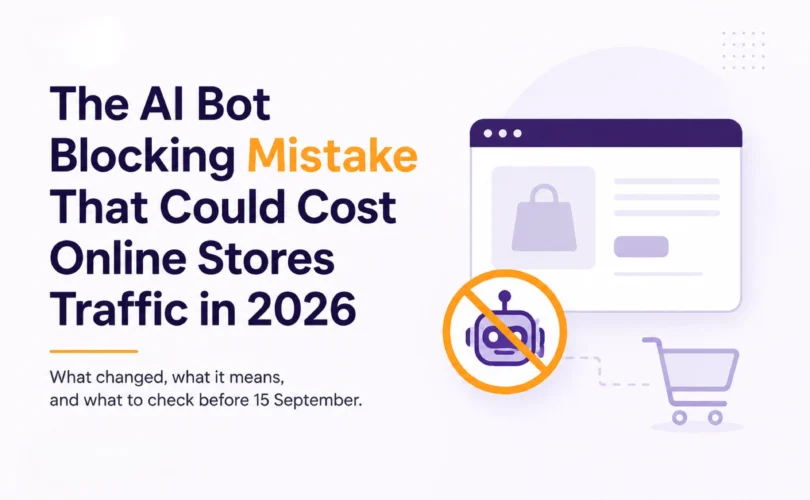

The AI Bot Blocking Mistake That Could Cost Online Stores Traffic in 2026
A Melbourne homewares store I looked at recently had a perfectly clean robots.txt. No blanket “block all AI” rule, no leftover 2024 panic-blocking. The block was happening one layer up, in the Cloudflare settings nobody had opened since the account was set up. That’s the pattern worth understanding before it costs you a channel you don’t even know you’re losing.
KEY FINDINGS
- Cloudflare will set new default AI-traffic rules on 15 September 2026: Training and Agent bots blocked by default on any page that carries ads, Search bots still allowed. Source: Cloudflare, “Your site, your rules,” 1 July 2026.
- The defaults apply to every new Cloudflare domain, every new site added by an existing customer, and all existing free-tier accounts, not just new signups. Source: Cloudflare, 1 July 2026.
- Multi-purpose crawlers that combine Search and Training, including Googlebot, Applebot, and Bingbot, will be blocked entirely on any site that has chosen to block Training bots. Source: Cloudflare, 1 July 2026.
- Shopify applies stricter rate limits to any bot or agent hitting the Storefront API or Shopify-hosted store pages that doesn’t sign its requests with Web Bot Auth, effective 7 May 2026. Source: Shopify developer changelog, 7 May 2026.
Cloudflare Is Changing Its Defaults on 15 September. Most Merchants Haven’t Looked.
Cloudflare sits in front of many ecommerce sites, including Shopify and WooCommerce stores using it for CDN and security. On 1 July 2026, it announced that from 15 September, new defaults kick in: pages that carry ads will have Training and Agent bots blocked automatically, while Search bots stay allowed.
The “Agent” category is the one that matters most for a store. Cloudflare defines it as automated behaviour acting in real time on a shopper’s behalf, the exact mechanism behind a customer asking ChatGPT to check a product page or complete a task through an AI assistant. If your store runs any ad-monetised content, a blog with display ads, an affiliate section, a comparison page, those pages lose real-time AI agent access by default from that date unless someone changes the setting.
The sharper risk sits in how the rule stacks. Cloudflare has confirmed that from 15 September, multi-purpose crawlers, Googlebot included, get blocked entirely on any site that has chosen to block Training bots, through either the new controls or the older one-click “Block AI Bots” preset most merchants clicked in mid-2025 without reading the fine print. A setting aimed at keeping content out of AI training can accidentally affect Google Search access if it catches multi-purpose crawlers under the stricter rule. That’s not only an AI visibility problem. It can become a ranking problem too.
Shopify Already Flipped a Version of This Switch. It Happened in May.
Cloudflare’s September deadline isn’t the only one that matters here. Shopify moved first. On 7 May 2026, Shopify’s own developer changelog confirmed stricter rate limits on any bot or agent accessing the Storefront API or Shopify-hosted store pages without a signed identity. Unsigned traffic gets the strictest tier available. Signed traffic gets through reliably.
The identity system behind this is called Web Bot Auth, a Cloudflare-led protocol now under IETF standardisation. Instead of a bot claiming to be ChatGPT through a spoofable user-agent string, it signs each request with a cryptographic key published at a known location, and the receiving platform checks the signature before deciding how much access to grant. Shopify, AWS, Vercel, and Akamai have all built support for it, which is what turns this from one platform’s rule into the emerging basis for how any AI agent proves who it is anywhere on the web.
Cloudflare has been candid about the limit of this system: verification favours whoever can afford to be identifiable. A large AI lab signing its requests clears the bar without friction. A smaller or newer agent operator, or a merchant’s own custom crawler that was never set up to sign anything, sits in the throttled tier by default, indistinguishable from a scraper. For a Shopify store, the practical version of this is straightforward: the shopping agents from ChatGPT, Perplexity, and Copilot that Shopify’s Agentic Storefronts feature is built to work with are signing their requests. If your own store runs any custom crawler, accessibility checker, or automated tool against your own site, and it isn’t signed, you may be looking at throttled access to your own data without anything else having changed.
Merchants don’t need to build anything to benefit from the vendor side of this. Shopify already generates ready-to-use Web Bot Auth signatures inside the Shopify admin for merchants who want to authorise their own crawling and testing tools.
The 2024 Advice Was Right for Publishers. It Was Never Right for Stores.
The instinct to block AI crawlers came from a real, specific problem: in 2023 and 2024, GPTBot scraped content to train ChatGPT and gave nothing back, and media publishers whose articles got summarised lost click-through they depended on for ad revenue. Blocking made sense there.
That advice spread to ecommerce by copy-paste, and the underlying economics were never the same. A product page is not economically the same as a news article. In ecommerce, the bigger risk is often not that an AI agent reads the product page; it is that the page cannot be read when a shopper is ready to compare or buy. Craftshift, a Shopify app partner, put it plainly after working through merchant accounts in 2026: the store owners who blocked AI bots in 2024 are now the ones scrambling to undo it, because ChatGPT, Perplexity, and Google AI Mode have become a real referral channel and a blocked store is invisible to it.
Shopify’s own Agentic Storefronts feature makes this concrete. It pushes merchant product data into ChatGPT, Copilot, Perplexity, and Google AI Mode automatically. A store owner who separately blocks AI search or user-fetch bots at the CDN or firewall layer may be working against a discovery pathway their platform is trying to open.
Not Every AI Bot Does the Same Job. Treating Them as One Category Is the Actual Mistake.
The specific error compounding all of this is bucketing every AI crawler under one “AI bots” toggle. They don’t do one job. Training bots (GPTBot, ClaudeBot) feed model training and usually have less direct short-term referral value for product pages, so blocking them carries limited downside for many stores. Search-index bots (OAI-SearchBot, PerplexityBot, Bingbot) build the index ChatGPT and Perplexity actually search against when a shopper asks a question. User-fetch bots (ChatGPT-User, Claude-User, Perplexity-User) fetch your page in real time because one specific shopper’s query triggered it.
Blocking training-only bots may be a reasonable choice for many ecommerce stores, especially where the goal is to prevent catalogue or content use in model training. But blocking search-index and user-fetch bots is a different decision because it can affect whether AI systems can retrieve or cite your pages. Block the second or third and you disappear from the exact moment a customer is deciding where to buy. Most store owners who ran a blanket block in 2024 blocked all three, because the advice at the time didn’t distinguish between them.
A 53% Block Rate Looked Like Protection Working. It Was Blocking Bing.
An Australian ecommerce client we work with got hit with a scraper wave: roughly 289,000 requests against 107,000 unique visitors in a single day. The traffic was landing in analytics as Direct, the way most unlabelled bot traffic does, and it was skewing the numbers badly enough that Direct looked like it had become the site’s biggest channel overnight. That’s what pushed the decision to act fast: Cloudflare’s AI-bot blocking, plus a custom user-agent blocklist, switched on quickly.
The first sign something had gone wrong wasn’t in the traffic numbers. It was in Cloudflare’s own AI Crawl Control dashboard. Googlebot was through at 5.33k allowed requests. ChatGPT-User was through at 362. Claude-User was through at 5. Perplexity sat at zero, across every PerplexityBot variant, despite nothing in the intent being “block Perplexity specifically.” The rule was supposed to stop training crawlers. It had also stopped a bot family associated with AI search and citation entirely, and the dashboard was the only place that discrepancy was visible, because a percentage-based block rate doesn’t tell you which bots make up that percentage. So no matter how much ecommerce SEO work or GEO work had been done, the store still wouldn’t have been recommended by Perplexity or any other platform in a case like this, where more gets blocked than anyone intended.
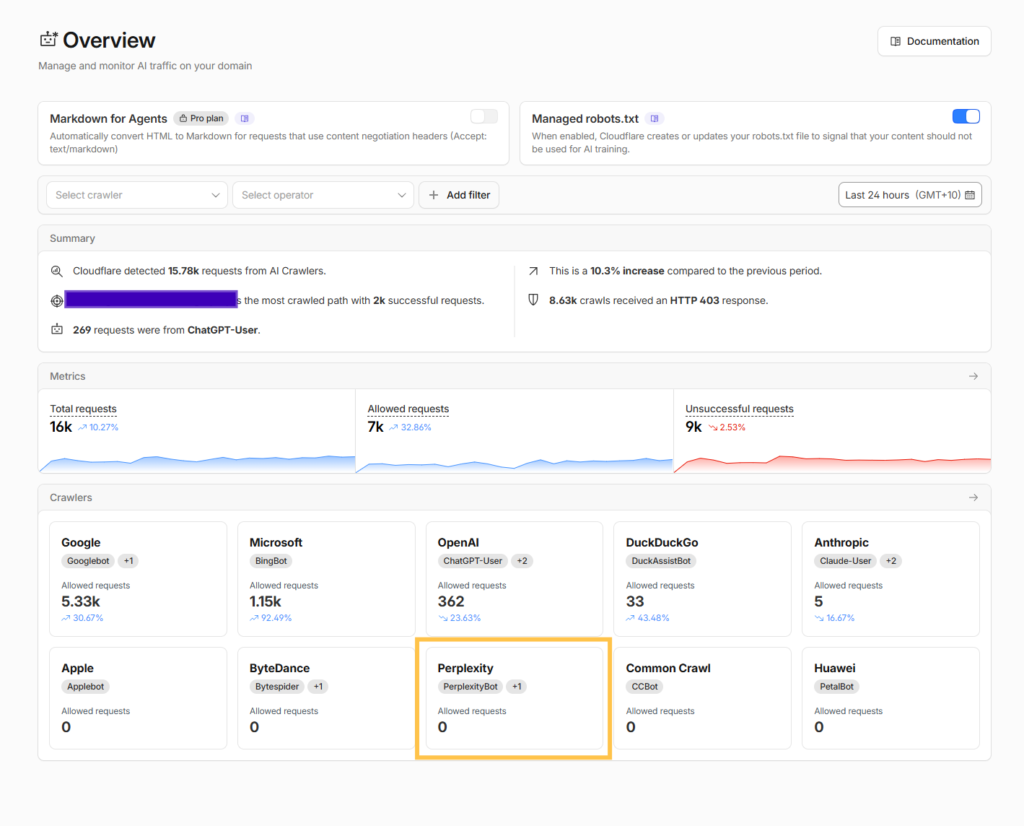
That single zero was the reason to open the account’s bot controls and check them line by line, rather than trust that an 8,900-of-16,660 block rate meant the right 8,900 requests were the ones getting blocked.
Cloudflare gives every account a simpler control than a custom rule: a per-crawler toggle list under Security, one line per bot, each with its own on/off switch and a category label, Search Engine Crawler, AI Search, AI Assistant, or AI Crawler. The sensible defaults are straightforward. Search engine crawlers like Bingbot and Googlebot should stay off, meaning allowed. Citation-style bots like ChatGPT-User, OAI-SearchBot, and DuckAssistBot should stay off too, since blocking them removes you from the answer engines people are actually asking. Pure training crawlers with no citation function, GPTBot, Bytespider, CCBot, PetalBot, are the ones worth switching on, meaning blocked.
That’s the theory. In practice, this exact toggle list is where the client’s account had already drifted from it. Claude-SearchBot and PerplexityBot, both categorised AI Search, both citation engines rather than training crawlers, were switched to blocked. Baidu, categorised as a Search Engine Crawler, was blocked too, the same way Bingbot shouldn’t be. The toggle list makes the fix trivial once you’ve spotted it, flip the switch, but it doesn’t explain why a bot ended up blocked in the first place, or whether a custom rule elsewhere is enforcing the same block a different way. For that, the account’s custom rules needed a closer read.
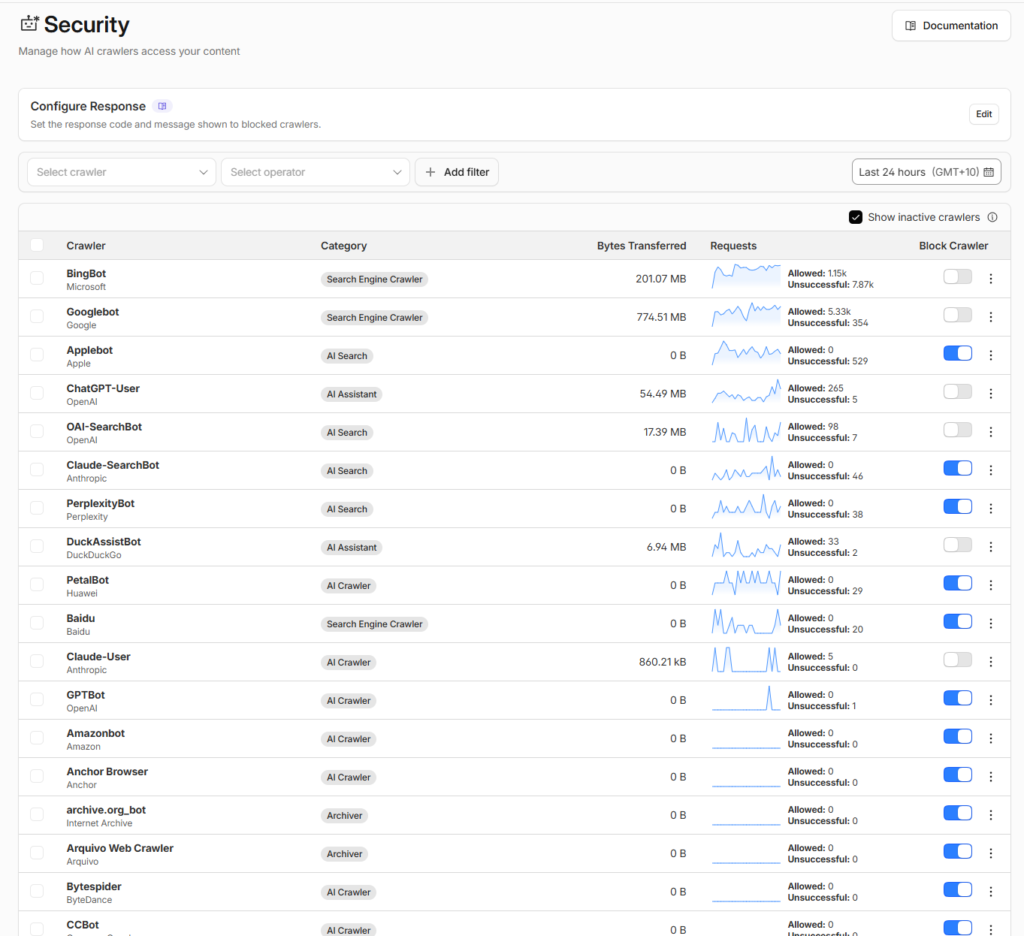
Cloudflare’s native per-crawler toggle list under Security: Claude-SearchBot, PerplexityBot, and Baidu switched to blocked alongside legitimate training-only bots.
Three separate mistakes were sitting inside the custom blocklist doing the heavier enforcement, and none of them were visible from the dashboard.
The first was a substring match. Entries like “Chrome/11,” “Chrome/65,” and “Firefox/72” were written to catch scrapers spoofing old browser versions. “Chrome/11” also matches “Chrome/110” through “Chrome/119,” and it matches modern Bingbot’s evergreen user-agent, which embeds a Chrome token. Nobody writing that rule intended to block Bing. The same mistake sat one line above it: “Applebot” matches both Apple’s search crawler and “Applebot-Extended,” its separate AI-training crawler. Only the second was meant to go.
The second mistake was treating every AI crawler as the same threat. “GPTBot” and “CCBot” were blocked, reasonably, alongside “PerplexityBot,” “Perplexity-User,” and “Claude-SearchBot,” which shouldn’t have been. The intent, keep the catalogue out of model training, was sound. The rule reached further than intended and removed the store from the answer engines that actually send referral clicks.
The third was that the declared policy and the enforced policy disagreed with each other. The site’s robots.txt read “search=yes, ai-train=no, use=reference,” a coherent index-me-cite-me-don’t-train-on-me position. The firewall enforced something stricter, blocking several of the citation engines robots.txt was inviting in. In the other direction, robots.txt disallowed Google-Extended and ClaudeBot, and the firewall let both straight through. Two layers, no single policy between them.
The clearest sign this had been half-noticed already was a separate rule further down the same list: “Allow Product Pages – Skip Bot Challenge.” Someone had spotted legitimate traffic getting challenged and patched the narrowest surface available, individual product URLs, rather than the rule causing it. Category pages and commercial pages, where the actual money keywords live, stayed exposed.
None of these three mistakes shows up in a block-rate percentage. All three show up the moment you check user-agent strings against robots.txt line by line, instead of trusting a dashboard summarising itself.
Both fixes were one line each. The substring entries came out, the training-only list was rebuilt to exclude anything with a citation function, and the rule that reached the account today reflects that split.
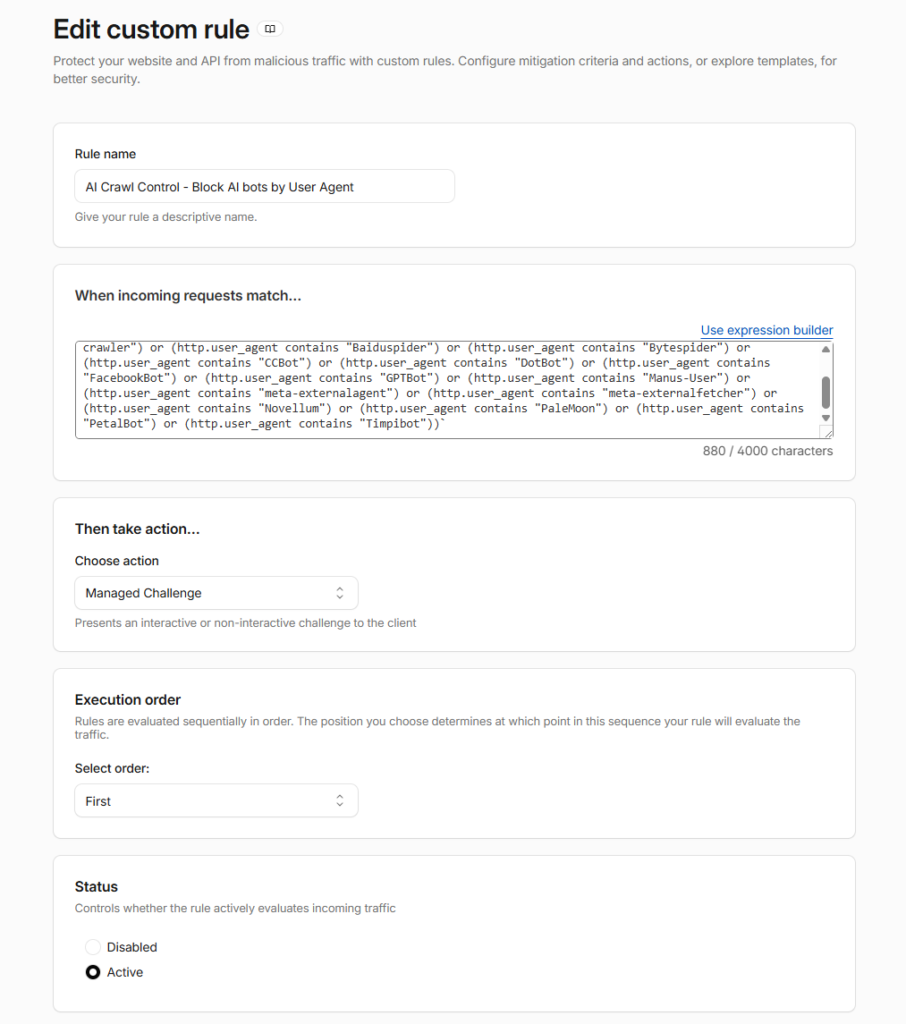
What’s left in that list is the version worth learning from as much as the version that broke. Baiduspider, Bytespider, CCBot, DotBot, FacebookBot, GPTBot, Manus-User, meta-externalagent, meta-externalfetcher, Novellum, PaleMoon, and PetalBot, every one of them a training or scraping bot with no citation function. No PerplexityBot. No Claude-SearchBot. No Chrome/11 doing double duty as a Bingbot filter. The list didn’t get shorter because the client stopped caring about scraper traffic. It got shorter because every entry left in it now has to justify its place against the same question: does this bot train, or does it cite? Only the first kind stays blocked.
What to Actually Check on a Shopify or WooCommerce Store
These checks sit underneath whatever platform-specific work is already in place, whether that’s ongoing Shopify SEO or WooCommerce SEO. None of it replaces that work. It just makes sure the bot layer isn’t undoing it.
Check your Cloudflare Security settings now, not in September.
If your account has the legacy “Block AI Bots” preset enabled, or you’ve separately opted to block Training bots under the new categories, confirm you understand what else that takes down once the 15 September default applies to multi-purpose crawlers. This is a quick check with a genuinely bad failure mode if it is wrong.
Separate training blocks from search and agent access.
If you have a principled objection to your product copy training a model, block GPTBot and ClaudeBot specifically. For most ecommerce stores, the starting point from there is to separate training-only bots from AI search and user-fetch bots, then decide which of the search and user-fetch bots, OAI-SearchBot, PerplexityBot, ChatGPT-User, Claude-User, and Perplexity-User among them, should remain accessible under appropriate rate limits and monitoring rather than blocked outright.
Check your security plugins separately from your CDN.
WooCommerce stores running Wordfence or iThemes Security sometimes ship “block all unknown bots” modes that catch AI crawlers the same way an over-broad CDN rule does. The fix is a whitelist entry, not a debate about whether to allow AI traffic at all.
Don’t touch your cart, checkout, or account paths.
Shopify’s default robots.txt already blocks these for every bot, AI included, and that’s correct. The audit is about content and product pages, not checkout security.
Re-test after any theme or plugin migration.
Robots.txt and firewall rules both have a habit of resetting to old defaults during a platform update. If you fixed this once, confirm it’s still fixed after your next theme change.
Test substring rules against real bot strings before deploying them.
“Chrome/11” catches “Chrome/110” and Bingbot’s Chrome token. “Applebot” catches “Applebot-Extended” too. Write substring rules, then check what else they match.
Match your robots.txt against your firewall rules line by line.
A site can have a coherent bot policy in robots.txt and a completely different one enforced at the firewall, and nothing on either dashboard will tell you they disagree.
The AI Bot Access Audit for Ecommerce
Run these four checks in order, treat them as separate problems rather than one setting, and treat the whole exercise as an extension of ongoing technical SEO work rather than a one-off fix.
CDN and firewall.
Open your Cloudflare (or equivalent) Security settings and confirm what’s actually blocked at the network layer, separate from robots.txt. This is the layer most store owners have never opened.
Security plugin.
If you’re on WooCommerce, check Wordfence or your equivalent for an aggressive bot-blocking mode and add the major AI user-agents to its allowlist if needed.
Robots.txt.
Confirm there’s no leftover “Disallow: /” against GPTBot, ClaudeBot, OAI-SearchBot, PerplexityBot, ChatGPT-User, or Claude-User from a 2024-era block that was never removed.
Server logs.
Once the above is clean, check for GPTBot, PerplexityBot, and ChatGPT-User requests in your access logs over the following week. If they don’t appear, something upstream is still blocking them.
None of this is a content project. It’s a configuration audit, and the failure mode of skipping it isn’t a slow decline, it’s the exact date your store goes dark to an entire cohort of AI shopping traffic without a single change to your product pages. It’s also one piece of the broader SEO services in Melbourne we build for ecommerce, trades, and service businesses across the city.
Frequently Asked Questions
Will blocking AI training bots hurt my Google rankings?
Not on its own. GPTBot and Googlebot are separate crawlers. The risk is indirect: if your Cloudflare account is set to block Training broadly and Cloudflare’s 15 September default treats multi-purpose crawlers like Googlebot as Training-classified when that setting is on, you can take down Google visibility while trying to block ChatGPT.
Does Shopify block AI bots by default?
No. Shopify’s default robots.txt allows the major AI search and user-fetch bots and only disallows admin, cart, checkout, and account paths for everyone. If your store is blocking AI crawlers, it’s almost always a rule someone added manually, or a CDN-level setting inherited from a security preset.
Should I block GPTBot on my ecommerce store?
That’s a values decision, not a traffic one. Blocking GPTBot stops your content training OpenAI’s models and has close to no cost, since typical product content has limited training value. It has zero effect on whether ChatGPT can search your site or fetch your pages for a shopper’s query, provided you leave OAI-SearchBot and ChatGPT-User open.
What is Web Bot Auth, and do I need to do anything about it?
It’s a cryptographic signing system that lets a bot prove its identity to a website instead of relying on a user-agent string alone. Most Shopify merchants don’t need to configure anything: the major AI shopping agents sign their own requests already. It matters if you run your own custom crawler, SEO auditing tool, or automated tester against your store, in which case an unsigned setup now gets throttled. Shopify admin has ready-made signatures for this.
Is fixing bot access the same as doing AI SEO?
No. Bot access is the precondition, if a bot can’t reach your page, nothing else matters, but it’s only the first layer. Broader AI SEO work covers content structure, citation signals, and entity consistency across platforms, which is what determines whether AI systems recommend you once they can actually read you.
How long after fixing this will I see AI referral traffic?
It varies. After access is restored, monitor server logs and AI referrals over the following few weeks. Some AI search systems may revisit pages quickly; others may take longer, and Google AI Mode may lag behind.
Want to know exactly what’s blocked on your store right now?
Get an AI Visibility AuditOr read how AI systems retrieve and cite ecommerce pages once they can actually reach them.